Launch Offer Full suite — free for early members. Access closes to new free members soon. Get free access →
All Indicators
Now Live on TradingView

Know the phase
before you
trade it.

Most EMA indicators tell you where price has been. The EMA Trend State Engine tells you where the market is in its cycle right now — Markup, Markdown, Accumulation, Distribution, or Transition — so you stop entering at the wrong point.

No Signals No Repaint Adaptive EMA All Instruments All Timeframes
Cloud State
Expanding → Strong
EMA Trend State · US500 · 5m MARKUP
Markup All EMAs bullish & rising → Phase active
Markdown All EMAs bearish & falling
Accumulation Bearish order, momentum stalled
Distribution Bullish order, momentum fading
Transition Mixed EMA order — no clear edge
Phase Duration
12 bars
HTF Bias
Bullish
ADX
34.2 Trending
RSI
62.4 Bullish
Instrument
Indices ✓ Auto-detected
The Five Phases

The complete market cycle. Classified automatically.

A Wyckoff-inspired state machine that reads the ordering and slope direction of three EMAs — fast, mid, slow — and tells you exactly where in the cycle the market sits.

▲ Markup

All three EMAs in bullish order and rising. The strongest long environment. A wide, expanding teal cloud means momentum is building. A compressing cloud means the move may be maturing.

▼ Markdown

All three EMAs in bearish order and falling. The strongest short environment. A wide, expanding red cloud means selling momentum is strong. Compression signals the move is aging.

▬ Accumulation

After a Markdown phase — bearish order but EMAs have stopped falling. Selling pressure has dried up. Smart money builds positions here before the next Markup phase begins.

▬ Distribution

After a Markup phase — bullish order but EMAs have stopped rising. Buying pressure is fading. Early longs take profit here before the next Markdown phase begins.

― Transition

Mixed EMA order — the market is between phases. No clear directional edge exists. A grey cloud means choppy conditions where forcing trades is most likely to cost you.

See It In Action

Live on US500 · 5-Minute.

The colour-coded cloud tells the complete story — Markdown turning to Accumulation turning to Markup, visible in a single glance.
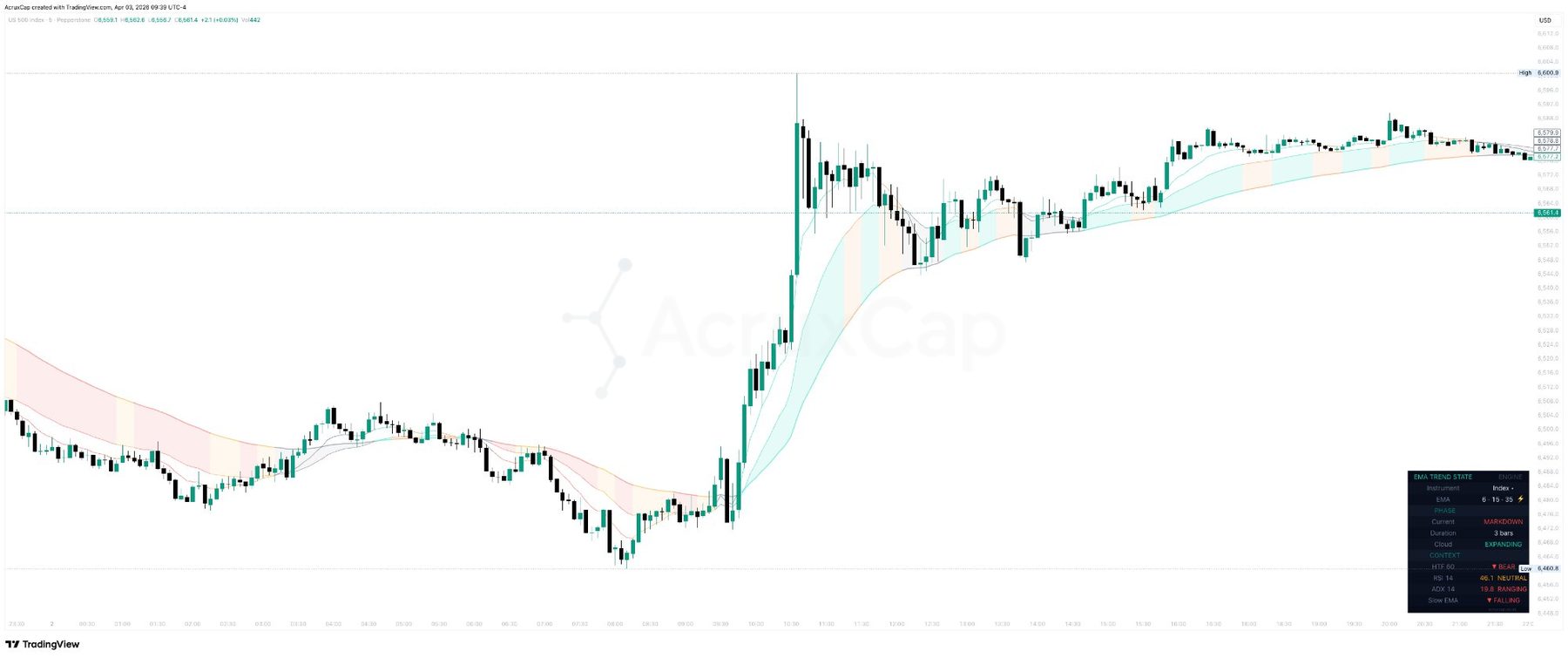
EMA Trend State Engine TradingView — US500 5-minute chart showing adaptive EMA cloud phases Markup Markdown Accumulation with dashboard
US500 · S&P 500 Index · 5-Minute · EMA Trend State Engine

The adaptive EMA cloud shifts from red (Markdown) through amber (Accumulation) to teal (Markup) as the market cycles through phases. A wide, expanding teal cloud confirms strong bullish momentum. The dashboard bottom-right shows detected instrument class, adaptive EMA lengths, current phase and duration, cloud expansion status, HTF bias, RSI, and ADX in real time.

Why Context Beats Signals

Most losing trades aren't the wrong entry. They're the right entry at the wrong point in the cycle.

Buying a breakout during Distribution. Shorting a dip during Markup. The technique was fine — the context was wrong. The EMA Trend State Engine solves this by telling you which phase the market is in before you look at any signal or setup.

It doesn't generate buy or sell signals. That's deliberate. It gives you the context to make those decisions yourself — or to filter signals from any indicator you use alongside it.

Simplest use

Check the cloud before every trade

Before entering any position, glance at the cloud colour. Teal = look for longs. Red = look for shorts. Amber or orange = be patient. Grey = stay out or reduce size.

Phase transitions

Amber → Teal: the setup is forming

When the cloud shifts from Accumulation to Markup, the market is transitioning from basing to trending. Combine this with your entry criteria for a high-context long setup.

Cloud compression

A compressing cloud = aging move

When a wide teal cloud starts narrowing, the Markup phase is maturing. When it shifts to orange, the uptrend is likely ending. Tighten stops or take profit on existing longs.

Signal filtering

Only take signals that match the phase

Overlay on any AcruxCap indicator. If your buy signal fires during Markup, the phase agrees. If it fires during Transition or Distribution, it doesn't — and you can choose to skip it.

Pairs Well With

Built to complement any entry tool.

Overlay the EMA Trend State Engine alongside any AcruxCap indicator — or any third-party tool — to add phase context to every signal.

SMC Edge Pro

Use the cloud to confirm directional bias before taking order block entries. Only take bullish OB setups during Markup. Only take bearish OB setups during Markdown.

HMA Precision Pro

Use the phase to filter HMA crossover signals. Buy signals during Markup, sell signals during Markdown. Skip signals firing in Transition or against the phase.

ScalpEdge Pro

During Markup, focus exclusively on buy-side scalps. During Markdown, sell-side only. During Transition, reduce size or wait for the next phase confirmation.

BB VWAP Edge Pro

Mean reversion setups work best in Transition, Accumulation, and Distribution. Trend-following setups work best in Markup and Markdown. The phase tells you which mode to be in.

Features

Everything the cloud needs. Nothing it doesn't.

Colour-Coded Phase Cloud

The area between the Mid and Slow EMA fills with colour based on the current phase — teal (Markup), red (Markdown), amber (Accumulation), orange (Distribution), grey (Transition). ATR-normalised width so it reads consistently across instruments.

Adaptive EMA Engine

EMA lengths adapt to ATR volatility automatically — expanding in low volatility to filter chop, contracting in high volatility to stay responsive. Clamped 0.7×–1.4×. Fully configurable or fixed manual lengths.

Wyckoff State Machine

Accumulation only valid after Markdown or Transition. Distribution only valid after Markup or Transition. This prevents false classification — a pullback in an uptrend doesn't get mislabelled as Accumulation.

Live Dashboard

Instrument class, adaptive EMA lengths, current phase and duration, cloud expansion status, HTF EMA bias, RSI with label, ADX with trend classification, and slow EMA direction. Three display modes: Full, Compact, Phase Only.

Phase Duration Warning

The dashboard displays an amber warning when a phase exceeds 30 bars — a signal that the phase may be mature and a transition could be approaching. Configurable threshold.

Phase Transition Alerts

TradingView alerts for each phase change — Markup, Markdown, Accumulation, Distribution. JSON webhook format includes current phase, previous phase, ticker, timeframe, and bar count. Ready for Discord, Telegram, or any automation.

FAQ

Frequently asked questions.

Why no buy or sell signals?

Deliberately. Phase context and entry signals are different tools for different purposes. The EMA Trend State Engine tells you which phase the market is in — that informs when and in which direction to trade. The actual entry decision is yours, or comes from your entry indicator. Combining context with signal is more powerful than any single tool that tries to do both.

Does it repaint?

No. Phase classification is based on confirmed bar close data. A phase change that appeared on bar 100 will still be on bar 100 if you reload the chart next week. No future data is used in any calculation — all higher-timeframe lookups use lookahead=off.

What timeframes and instruments does it work on?

All timeframes from 1-minute to weekly. All liquid instruments — US and global indices, forex, crypto, commodities. No session restrictions. The adaptive engine handles different volatility environments automatically based on ATR.

What is the difference between Accumulation and Transition?

Transition is a mixed state where the EMAs are not in clean bullish or bearish order — the market is genuinely between phases. Accumulation is more specific: it only appears after a Markdown phase when the bearish EMA order is still intact but downward momentum has stalled. The state machine enforces this distinction to prevent false classification.

Can I use it with a signal indicator from a different provider?

Yes. The EMA Trend State Engine is designed to complement any entry indicator, not just AcruxCap tools. Overlay it on any chart alongside any signal source. When your signal fires, check the cloud colour. If it agrees, the phase supports the trade.

What does the phase duration warning mean?

When a phase has been active for more than 30 bars, the dashboard displays an amber warning. This does not mean the phase is ending — but a long-running phase is statistically more likely to be in its later stages. It is context, not a signal. The threshold is configurable.

Get Access

The right trade
at the right point
in the cycle.

EMA Trend State Engine is included in your AcruxCap Pro subscription alongside all eight indicators in the suite — free for early members during the launch period.

Free for early members · No card required · Access closes soon

EMA Trend State Engine is a technical analysis tool provided for informational and educational purposes only. It does not constitute financial advice. Trading involves significant risk of loss.